Guide · Getting started · 9 min read
AI hug videos: the complete guide
An AI hug is the simplest trend video to get wrong. Two photos and a button press are easy; two people who genuinely look like they are holding each other are not. This guide covers the whole chain — what the model actually does, which photos survive it, how each scene changes the result, and where the artifacts come from.
Why hug videos travel further than dance clips
Dance and rap trends are performances: they work when the motion is loud and the edit is fast. A hug is the opposite. It is a single beat of stillness, which means the viewer reads the face, the hands, and the distance between two bodies. That is also why a hug clip can carry a caption a dance clip cannot — a reunion, an anniversary, a person who is no longer around to be photographed.
The format suits short feeds because nothing needs to be explained. There is no punchline to wait for and no audio to sync. A four-second embrace reads completely on mute, in a carousel, or as a story frame — which is why it converts better than most trend templates for accounts that are not performance-led.
How the model builds a hug from still photos
A hug generator does not animate your original photo. It rebuilds the scene around the two faces it finds, then animates that reconstruction. In practice the pipeline runs in three stages: detect and separate each person from their background, compose them into one shared frame with a single light direction and perspective, then render a short motion arc — approach, contact, settle.
That middle stage is the one people skip when they compare tools, and it is the reason some hugs look like two cut-outs pasted together. If the two photos are merged into one frame before the video model runs, the shoulders overlap correctly, the shadows agree, and the hands have somewhere believable to land. If they are handed to the video model raw, the model has to invent the merge while it is already inventing motion, and it usually invents it badly.
On our AI Hug template the merge happens inside the render, so you never see the intermediate image. What you do see is the consequence: photos with matching light and similar camera distance merge cleanly, and photos shot in wildly different conditions do not.
Practical takeaway: the merge is only as good as the two photos allow. Matching daylight and a similar camera distance do more for realism than any prompt you can type.
Choosing photos that survive the merge
Most disappointing hug videos are not model failures — they are photo selection failures. The model needs to answer three questions about each person: where is the face, where does the body end, and what is the light doing. Anything that hides those answers costs you realism.
- Faces at least a quarter of the frame, looking towards the camera, eyes open. A turned head forces the model to invent a profile it cannot see.
- Torso visible from the chest up. A tight headshot leaves nothing for the arms to wrap around.
- Even, front-facing light. Backlit photos and hard side shadows produce one person lit and one person flat.
- No sunglasses, no heavy filters, no group shots where the wrong face might be picked.
- Similar camera height between the two photos — two eye-level shots merge far better than one eye-level and one from above.
- Plain or uncluttered backgrounds. Busy backgrounds bleed into the merged scene as smears around the shoulders.
If you only have one good photo of each person, that is enough. Two mediocre photos that match each other beat two excellent photos that do not.
The 14 scenes, and what each one is actually for
A scene preset is not a filter. It sets the location, the light, the camera distance, and the emotional register of the motion — a reunion hug rushes, a lakeside hug settles. Picking the right one is mostly about matching the story you are telling, not the prettiest background.
- Reunion: Airport Reunion (arrivals hall, luggage in hand), Train Farewell (platform, last call), Welcome Home (doorway, bags down). These carry the most motion and suit captions about distance and time.
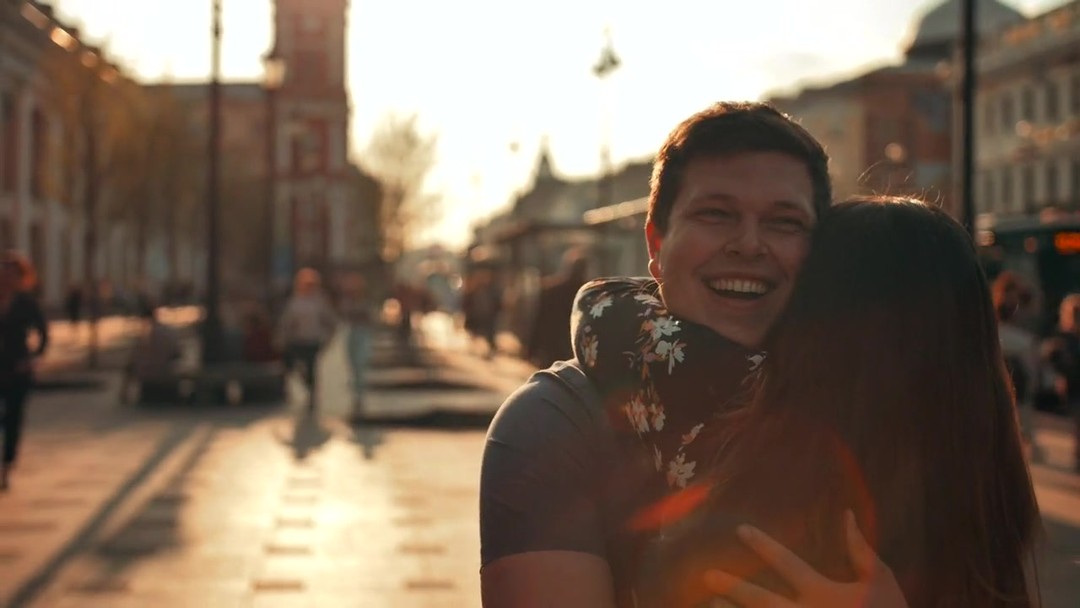
- Romantic: Golden Hour (warm backlight, slow sway), Sunset Beach (wide, wind in hair), Lakeside Embrace (still water, quiet), Wedding Day (formal, slow, restrained). Wedding Day is the one to use for announcements.
- Seasonal: First Snow (flakes between you), Rain Hug (wet street, umbrella edge), Christmas Hug (indoor lights, warm interior). Seasonal scenes date a clip — great in December, odd in July.
- Milestones: Graduation Day (gown, campus light), Birthday Surprise (indoor, confetti warmth). Both read as celebration without needing text.
- Playful and quiet: Bestie Bear Hug (fast, off-balance, laughing) for friends; Miss You (close, foreheads together, almost still) for the caption that does the talking.
Six of the fourteen scenes ship with a real sample clip. Watch two or three before you pick — the motion style matters more than the thumbnail.
One photo or two: which input to use
Two photos is the default and gives you the most control: each person is photographed in their own good light, and the model handles the merge. Use it when the two people were never in the same room, or when the only good photo of one of them is years old.
One photo works when you already have both people in the same frame — a couple photo, a family shot, a group picture where two faces are clear. The model splits the scene and rebuilds the hug in place, which keeps the original likeness and clothing consistent. The catch is that both faces must be clearly visible and facing the camera, because there is no second photo to fall back on.
Rule of thumb: one photo for a couple who already have a good picture together, two photos for everyone else.
Length and resolution: what the credits buy
Hug clips come in three lengths. Four seconds is the feed-native option and covers a single approach-and-settle beat. Eight seconds adds room for a held beat and a small camera move, which is what most people post. Fifteen seconds is for storytelling — a walk towards each other, the embrace, and a moment after.
Cost is per second of output, so length and resolution multiply. MiniMax H3 at 768P is the entry tier — sharp enough for a phone screen and a story frame. Seedance 2.5 at 720P is the safer default when the clip has to survive re-compression in Reels or TikTok. The top tiers — 2K on H3, 1080P on Seedance — are worth it only when the clip will be viewed large or downloaded and re-edited.
- MiniMax H3 at 768P: 160 / 320 / 600 credits for 4 / 8 / 15 seconds
- MiniMax H3 at 2K: 280 / 560 / 1,050 credits
- Seedance 2.5 at 720P: 600 / 1,200 / 2,250 credits
- Seedance 2.5 at 1080P: 1,040 / 2,080 / 3,900 credits
Test a new photo pair at 4 seconds on the entry tier first. If the merge holds, re-render the keeper at the length and quality you actually want.
Fixing the artifacts you will actually see
Every hug model fails in the same handful of places. Knowing them turns a vague feeling of wrongness into a specific fix.
- Hands that dissolve or gain fingers: crop the source photos so hands are not at the edge of frame — the model invents fewer of them.
- Faces that drift mid-clip: usually caused by one photo being much lower resolution than the other. Re-shoot or upscale the weaker one.
- A visible seam at the shoulders: the two photos had incompatible light. Convert both to the same warm or cool cast before uploading.
- Bodies that pass through each other: caused by extreme height difference in the source photos. A scene with a wider camera distance handles it better.
- A frozen first second: some clips open on a still frame before the motion starts. Trim the first half-second when you post — most editors do it automatically.
Consent, and the line worth not crossing
A hug is intimate by definition, which makes synthetic ones a different category from a dance clip. Two rules cover almost every situation: only use photos of people who would be comfortable seeing the result, and never generate an embrace involving someone who cannot consent — a public figure, an ex-partner, a stranger, or a person who has died without their family asking for it.
Memorial clips are the one genuinely delicate case. They can be a real comfort when the family is involved and the intent is clear, and they can be deeply upsetting when they are not. If the clip is for someone else, ask first. If it is for yourself, keep it private unless you have thought about who will see it.
Do not present a generated hug as documentary footage. Label it as AI if the context could mislead — a caption as short as made with AI is enough.
Publishing: the details that decide reach
The clip is only half the post. Three small decisions do most of the remaining work.
- Format: 9:16 for TikTok, Reels, Shorts and Stories. 1:1 if the same file has to work in a grid and a vertical feed. 16:9 only for YouTube and embedded players.
- First frame: pick a poster where both faces are visible. Hug clips often open wide before moving in, and a wide first frame reads as empty in a feed.
- Caption: name the relationship, not the tool. Long-distance reunion after 14 months outperforms AI hug generator every time.
- Sound: a hug clip works with ambient audio or a quiet track. Loud trending audio fights the stillness that makes the format work.
- Length on platform: trim to 4 to 6 seconds even if you rendered 15. The extra seconds are for you, not the feed.
Frequently asked questions
Do I need two photos to make an AI hug?
No. One photo works when both people are already in the same frame with both faces clearly visible — the model splits the scene and rebuilds the hug in place. Two photos give you more control and are the better choice when the two people were never photographed together.
Why do my two photos look pasted together?
Almost always mismatched light or camera distance. If one photo is backlit and the other is flat, or one is shot from above and the other at eye level, the merge has no consistent direction to work from. Matching the white balance of both photos before uploading fixes most of it.
How long does a hug video take to generate?
About two minutes at standard length. A fifteen-second render at 2K or 1080P takes noticeably longer than a four-second test at the entry tier, which is why it is worth testing the photo pair at the cheapest setting first.
Is there a watermark?
No. Clips are delivered clean at every quality tier, and you can download the file to post anywhere.
Can I use a photo of someone who has passed away?
Only with the family involved. Memorial hugs can be a genuine comfort, but they are also the fastest way to hurt someone if the intent is not shared. If the clip is for you alone, keep it private.
What resolution should I pick for TikTok?
MiniMax H3 at 768P is enough for a phone screen and keeps the render fast. Move to 2K or to Seedance 2.5 at 1080P only if the clip will also be downloaded, re-edited, or shown on a larger display.
Can I add my own prompt?
Yes, a short one, appended to the scene you picked. It is best used for details the presets cannot know — a specific location, an outfit, the reason for the hug — rather than for replacing the scene entirely.
Does the hug video have audio?
No. Clips are silent by design so you can attach the track that fits the post. Ambient or quiet audio suits the format better than loud trending sound.
Keep reading
Related guides
Put it into practice
Create a Video